Prerequisites for Azure DevOps with ModuleForge
The following steps need to be completed once per Azure DevOps project. You do NOT need to repeat this for each subsequent repository within an Azure DevOps project space.
Part 1 - Create a package feed
In order for us to publish and host our private modules, we need to setup a package feed.
If you have an existing feed, you can skip this process
- Within your Azure DevOps project, click on
Artifacts - select
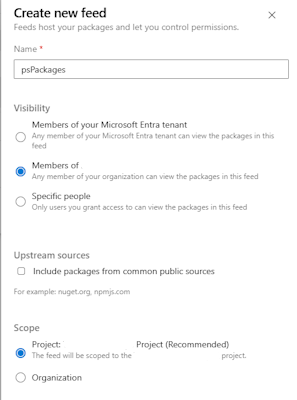
Create new Feed- Create a name for your feed. ModuleForge will by default expect it to be
psPackages- If you change the name of the default feed, you should also take care to update the Pipeline files after scaffolding.
- Set the visibility to
Members of {projectName} - You can disable Upstream sources
- Set the scope to the project level
- Create a name for your feed. ModuleForge will by default expect it to be
Part 2 - Grant Build Service Feed Permissions
This step is important to allow the Build and Release step to successfully publish artifacts to our feed
- Click on Artifacts again
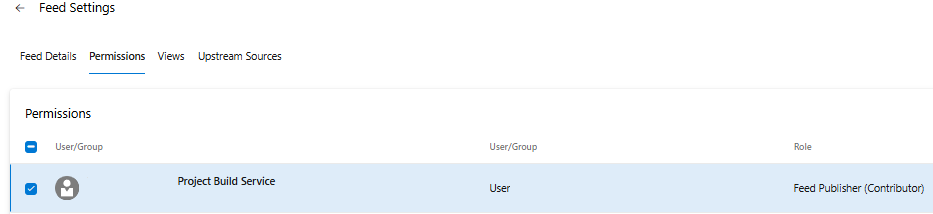
- With your
psPackages(or alternative name) feed selected, click on the small cog (⚙️) icon in the top right, that when hovered over statesFeed Settings - Select the
Permissionstab - Find and select the User/Group item that is labelled as Build Service, something like:
{ProjectName} Build Service ({OrganizationName}) - Select Edit and add the
Feed Publisher (Contributor)permissions - Save the changes
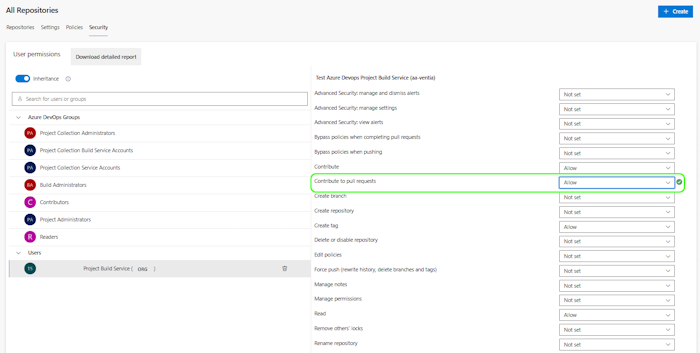
Part 3 - Grant Build Service PR Permissions
This step allows the Build Service agent to post comments to PRs within workflows
- Select the
⚙️ Project Settingsoption in the bottom right of the Project screen - Select the
Repos/Repositoriesmenu item - Select the
Securitytab - Ensure that the top of the display states
All Repositories.- If you like, you can permission this to individual repositories. Note that if you do so, you will need to follow this process for any new repositories in the future
- Find the Build Service account. something like:
{ProjectName} Build Service ({OrganizationName}) - Ensure the following permissions are set to
Allow:- Contribute to pull requests
- (Allows commenting on PRs for Lint and Pester Results)
- Contribute
- (Required for the BuildAndRelease process to correctly tag)
- Read
- (Required by all pipelines to pull the repository, read tags etc)
- Create Tag
- (Required for the BuildAndRelease process to correctly tag)
- Contribute to pull requests